
Overview
If you have ever tried to force a manager's approval into a standard automation tool, you know the pain. You usually end up building complex workarounds involving slackbots, webhooks, and fragile logic just to get a "yes" or "no" from a human.
Relay.app takes a different approach. It is an automation platform designed specifically to bridge the gap between AI agents, API calls, and actual human work. Instead of the traditional "set-it-and-forget-it" model, Relay treats human intervention as a native step in the workflow.
This tool is built for Operations, Sales, and Customer Success teams in small to mid-sized companies (5-50 employees) who need consistency. It helps you turn your Standard Operating Procedures (SOPs) into executable playbooks. If you are a founder or power user relying on tools like Notion, HubSpot, and Slack, Relay allows you to build logic that pauses for your input and then continues on its own.
Key Features
Human-in-the-Loop (HITL) Architecture
Most automation platforms view human involvement as a failure of automation. Relay views it as a feature. You can drag and drop specific "checkpoints" directly into your workflow that pause execution until a person interacts with it. They offer four specific types of human steps:
- Approvals: The workflow halts until a designated teammate hits "Approve" via Slack or email.
- Data Input: The system pops up a form asking for specific details needed to complete the next step.
- Task Completion: The automation assigns a real-world task (like "Call client") and waits for the user to mark it done.
- Manual Path Selection: A human reviews the context and manually chooses which logic branch the workflow should take next.
Intelligent Linked Objects
In many legacy tools, connecting data between apps requires tedious "search" steps to find IDs (like searching for a Contact ID before updating a Company record). Relay handles this with "Linked Objects."
When you trigger a workflow from a CRM deal, Relay automatically fetches the associated company, contact, and account owner data. It understands the relationship between these data points natively. This removes the need for redundant search steps and keeps your workflow visualizer clean.
Native AI & Agents
AI isn't bolted on here as an afterthought. You have access to built-in AI actions for things like summarizing meeting notes, classifying support tickets, or extracting specific fields from a messy document.
For more complex work, they offer "Mini AI Agents." These are semi-autonomous units you can configure with instructions to perform multi-step research or data processing tasks independently. You essentially delegate a chunk of work to the AI, and it reports back when finished.
The Personal Inbox
Since Relay relies on human interaction, things could get messy if notifications were scattered across different channels. The platform solves this with a centralized "Personal Inbox."
Every user gets a dashboard that aggregates all their pending approvals, data input requests, and manual tasks. It prevents the "lost in Slack" phenomenon and gives you a single view of where your automations are stuck waiting for you.
Pricing
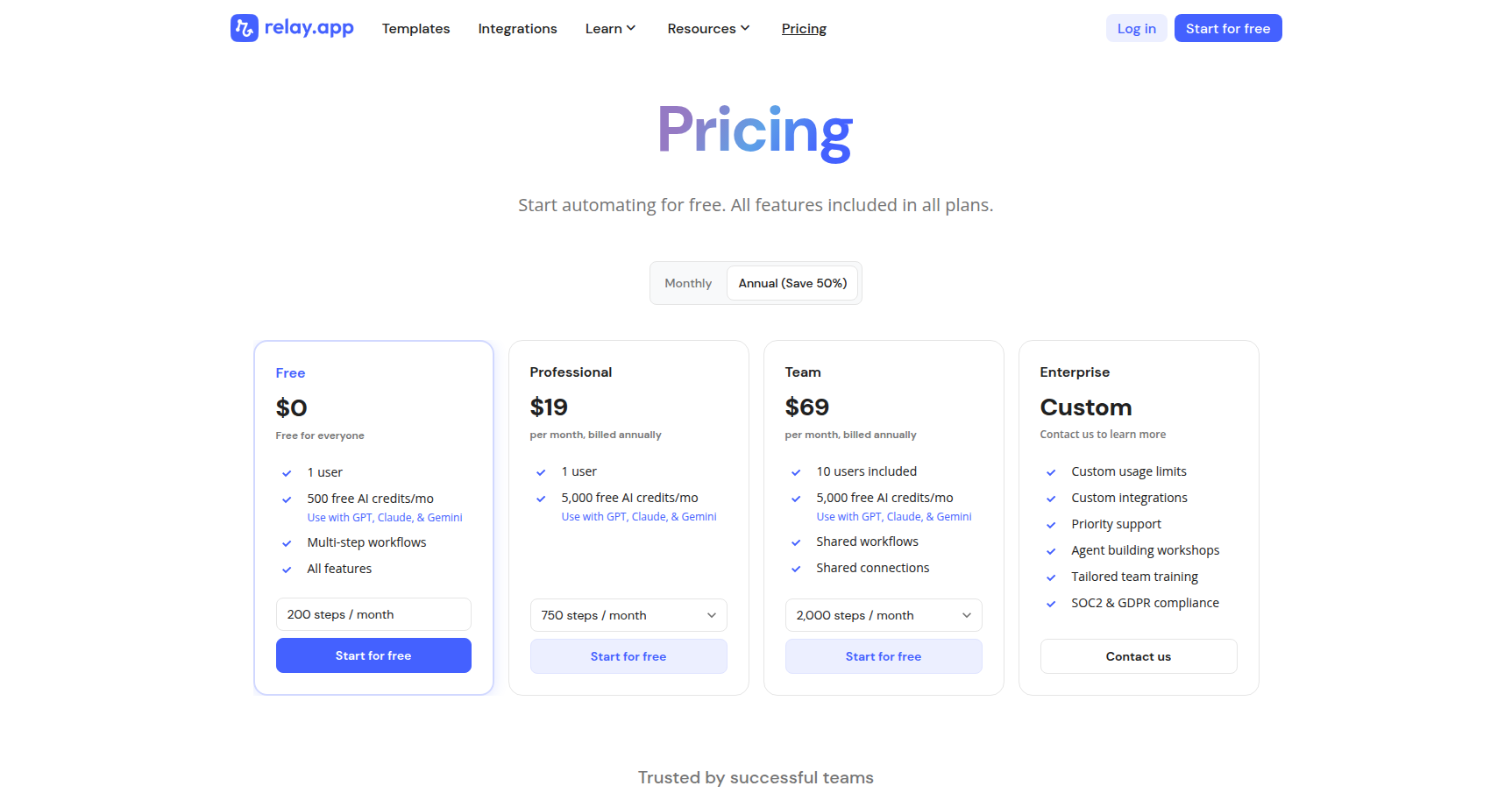
Relay.app offers a usage-based pricing model with a free tier that is surprisingly generous for testing.
- Free Plan: Good for testing or solo use. Includes 1 seat, 200 automated steps per month, and base AI credits. You get access to all core features and integrations here.
- Professional Plan: Targeted at power users. Costs approximately $19/month (billed annually) or $38/month (monthly). This bumps you to 750 steps and 5,000 AI credits.
- Team Plan: The sweet spot for collaboration. Costs approximately $69/month (billed annually) or $138/month (monthly). This supports up to 10 users, shared workflows, shared app connections, and 2,000 steps.
- Enterprise: Custom pricing for SOC 2 compliance, unlimited steps, and advanced security.
Note: They offer a free trial for the paid tiers if you want to test the higher limits.
Pros & Cons
The Good
- Native Human Steps: The ability to pause a workflow for an approval or data entry without writing custom code is a major relief for operations teams.
- Collaborative: Unlike many tools where automation is a solo sport, Relay allows you to assign steps to specific teammates via email or Slack.
- Visual Debugging: The builder shows live data from your apps as you build. You can see exactly what the output looks like at every step.
- Interface: The UI is modern and much more intuitive than the node-based spiderwebs found in older enterprise tools.
The Bad
- Integration Library: With 100+ native integrations, it covers the major SaaS players (HubSpot, Salesforce, Notion), but it is smaller than competitors who boast thousands of connectors. You may have to rely on webhooks for niche tools.
- Step Caps: The pricing tiers have hard caps on step counts. If you hit your limit, your workflows pause, which can be risky for mission-critical processes.
- Cloud-Only: There is no self-hosted option. If your organization requires on-premise software or has strict data residency requirements, this won't work for you.
Verdict
Relay.app is the right tool if your automations fail because they require judgment calls. It excels at "orchestration" rather than just raw data piping.
If you are just moving rows from a CSV to a database, a traditional linear automation tool is likely cheaper and sufficient. However, if you are building a client onboarding process where Sales needs to approve a contract, then AI needs to draft a welcome email, and finally Customer Success needs to manually verify the account setup, Relay is the superior choice.
It makes automation a team sport rather than a solo developer task. For startups and Ops teams drowning in manual handoffs, this is a strong recommendation.